Effective onboarding begins with clear, consistent communication. Standardized onboarding emails help create a strong first impression, set expectations, and guide users through the earliest steps of their journey. In addition to following general email design best practices, teams must also consider deliverability requirements to reduce the risk of messages landing in spam folders.
This guidance outlines the core principles and requirements for creating onboarding emails that are reliable, user‑friendly, and aligned across products.
Design for clarity, accessibility, and consistency
- Follow IBM design guidelines for typography, spacing, color, and accessibility (WCAG compliance).
- Use a clean, scannable layout with a clear hierarchy and one primary call to action.
- Maintain visual consistency across all product emails to reinforce trust and brand recognition.
- Ensure mobile responsiveness.
Write clear, recipient‑focused content
- Focus on the recipient’s immediate need, not internal processes, system language, organizational or overly-technical jargon.
- When applicable, personalize the greeting with the recipient’s first name.
- Use clear, direct, concise language that is confident and helpful.
- When applicable, clearly reference the product name within the email body to reinforce context and reduce ambiguity.
- Use action-oriented calls to action (CTAs) such as “Set up your account,” “Review your settings”.
- Maintain a neutral, inclusive tone.
- Avoid acronyms; if necessary, define them on first use.
- Use consistent terminology across products and touchpoints.
- Write for global audiences, avoid idioms or region-specific phrasing.
- Proofread carefully; use IBM-approved AI tools (for example, Acrolinx and Copilot) to increase efficiency, but ensure human review before publishing.
- Transactional emails (for example, email verification, provisioning complete) should focus solely on the required action or essential information.
- Non-transactional emails (for example, onboarding tips, product education) should remain concise, value-driven, and directly tied to user progress.
Align emails to the customer journey
- Maintain a shared mapping of all customer emails to ensure visibility across teams and avoid redundancy or overlap.
- Reinforce continuity between the previous and next email.
- Send emails immediately after the triggering action.
- Sequence educational emails intentionally to support adoption without overwhelming the recipient.
- Regularly review email performance to ensure each email contributes to activation, adoption, or retention goals.
Protect deliverability and trust
- Use verified sending domains and authenticated email protocols (SPF, DKIM, DMARC).
- Avoid spam-triggering language (for example, excessive capitalization, repeated punctuation, misleading urgency).
- Maintain a healthy image-to-text balance.
- Clearly state the purpose of the email in both the subject line and header.
- Provide clear unsubscribe or preference-management options where applicable.
Onboarding email templates
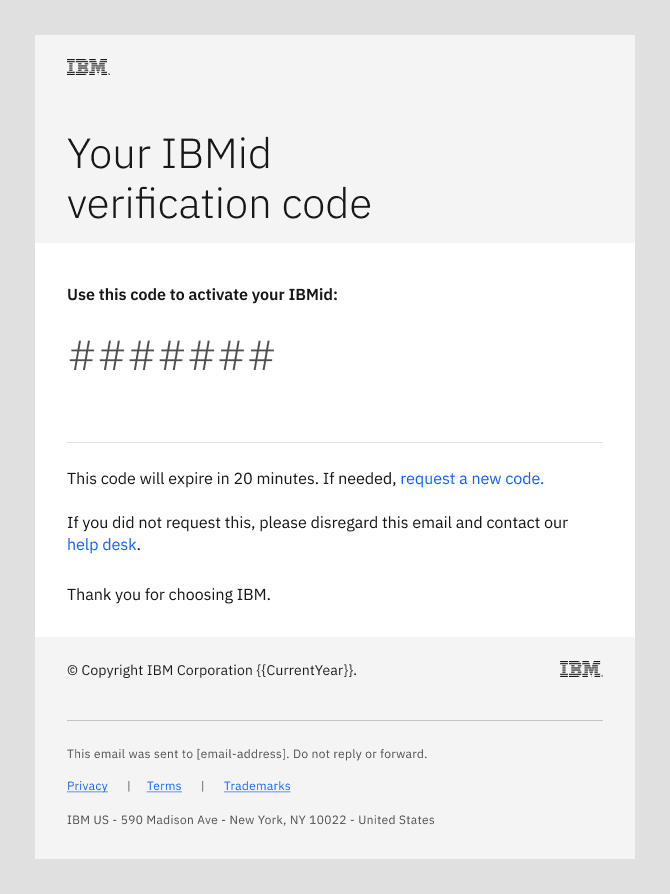
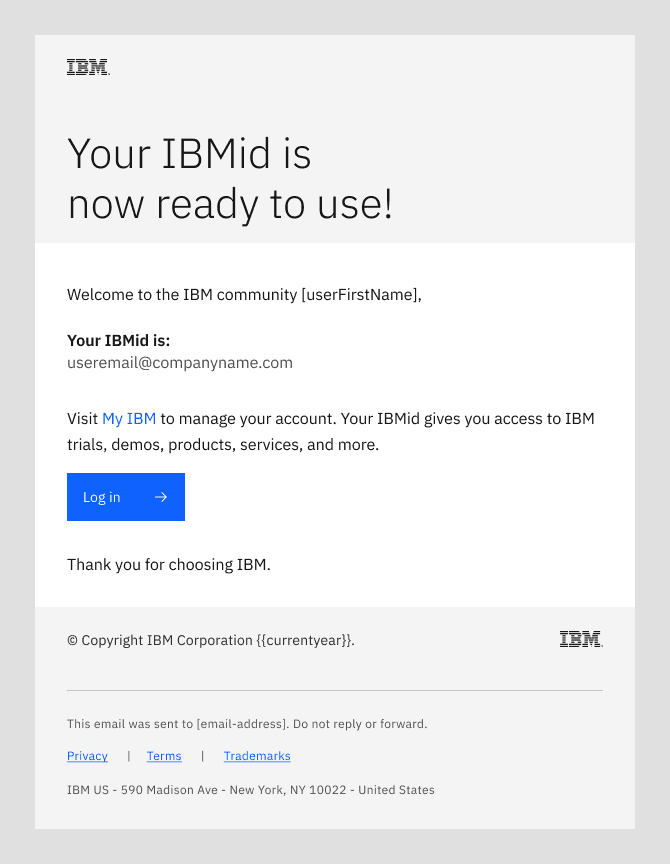
This section outlines six core onboarding emails; additional emails will be added in future releases. We’ve provided editable Figma files for the emails that product teams have control over. Do not modify the layout, structure, header, or footer of these templates. Only replace the placeholder copy. All design elements have been reviewed and approved to ensure consistency, accessibility, and performance across enterprise email clients.
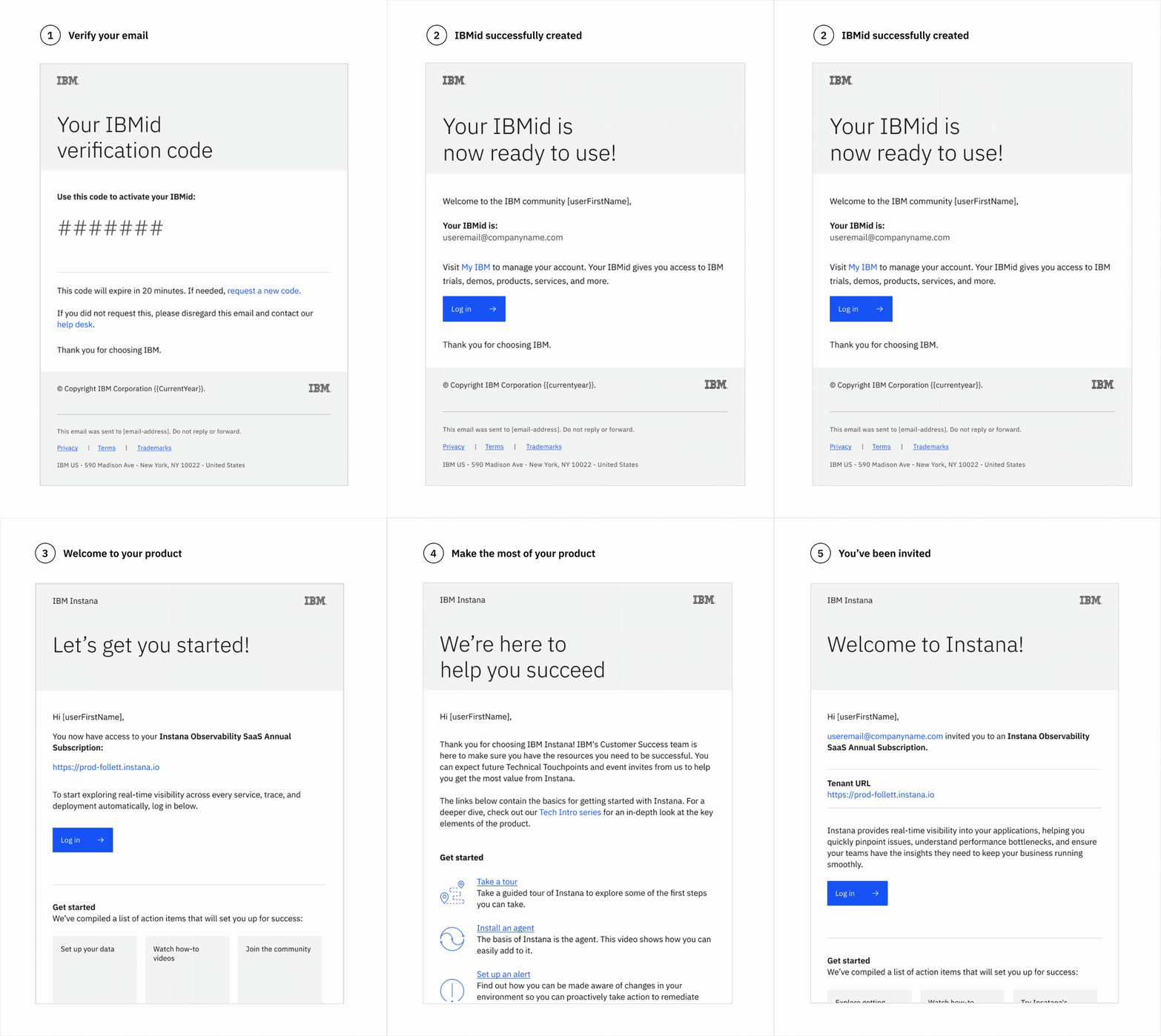
Title | Sent to | Sent by |
|---|---|---|
Buyer | CIO – IBM ID team | |
Buyer | CIO – IBM ID team | |
Buyer | Digital Innovation & Commerce (DI&C) team | |
Buyer / Admin | Product team | |
Buyer / Admin | Customer Success | |
New user(s) invited to the product | Product team |
Missing a core onboarding email? Reach out with your request.
Thank you for your order
- Trigger: Buyer or admin completes a purchase.
- Subject line: Thank you for your [Product name] order - [order number]
- Sender: Digital Innovation & Commerce (DI&C) team
- Tool: FastSpring
- Recipient: Product buyer and/or admin
Note: We’re working closely with the Digital Innovation & Commerce (DI&C) team; check back soon for the final template.
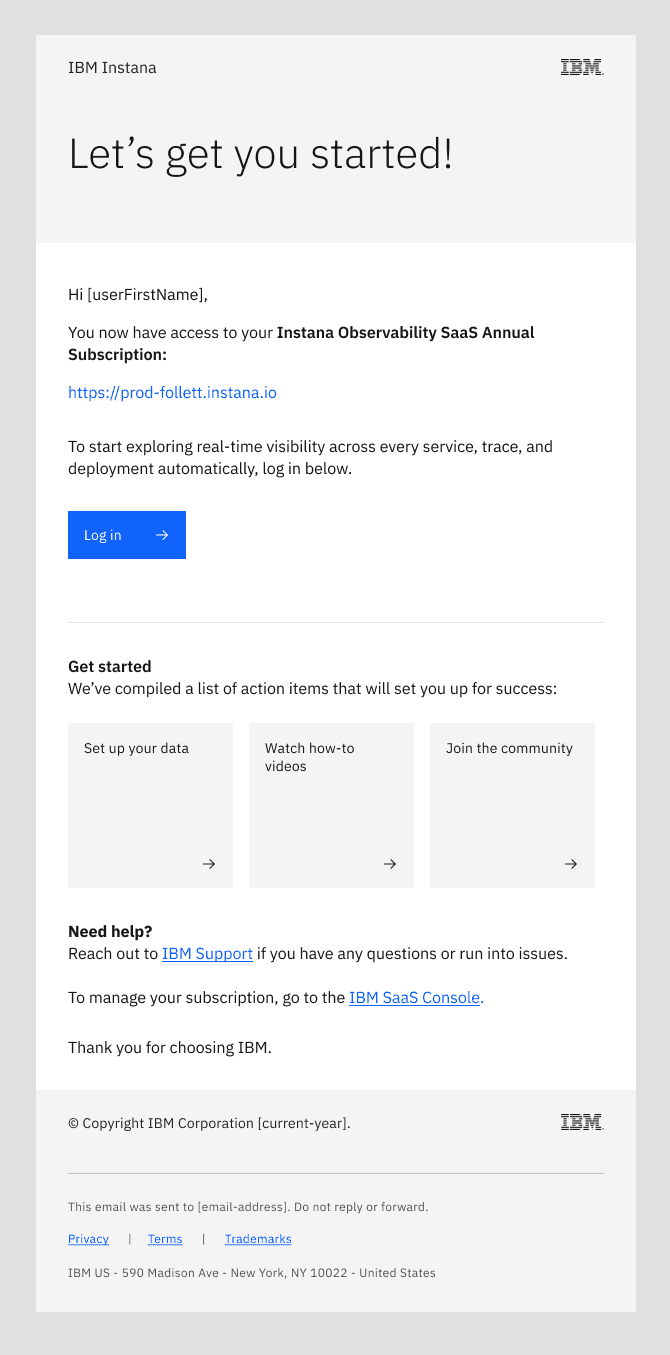
Do
- Deliver this email as soon as product access is granted to maintain momentum.
- Reinforce the value of the product by briefly describing what it enables (real‑time visibility, performance insights, issue detection).
- State explicitly what variation of the product the user now has access to (for example, Instana Observability SaaS Annual Subscription).
- Include a clear primary CTA such as “Log in” to access the environment.
- Focus on the recipient’s main job to be done and aha moment (for example, “Start observing your own data”), highlighting the first actions that help users experience the product’s core value quickly.
- Offer additional CTAs that support early success (product documentation, community).
- Provide a clear path for help (for example, IBM Support) and subscription management (for example, IBM SaaS Console).
Don't
- Overwhelm recipients with too many CTAs; focus on the 2–3 key actions an admin must take after purchase.
- Use generic CTA language such as “Click here” or “Learn more”, CTA language should specify the purpose or outcome behind the action.
- Rely solely on descriptive marketing language; prioritize practical guidance.
- Duplicate the content in the Customer Success “welcome” email (typically sent after this email by an IBM Customer Success Manager).
- Repurpose this email for trial users. While the overall structure might apply, the subject line and content should be trial-specific.
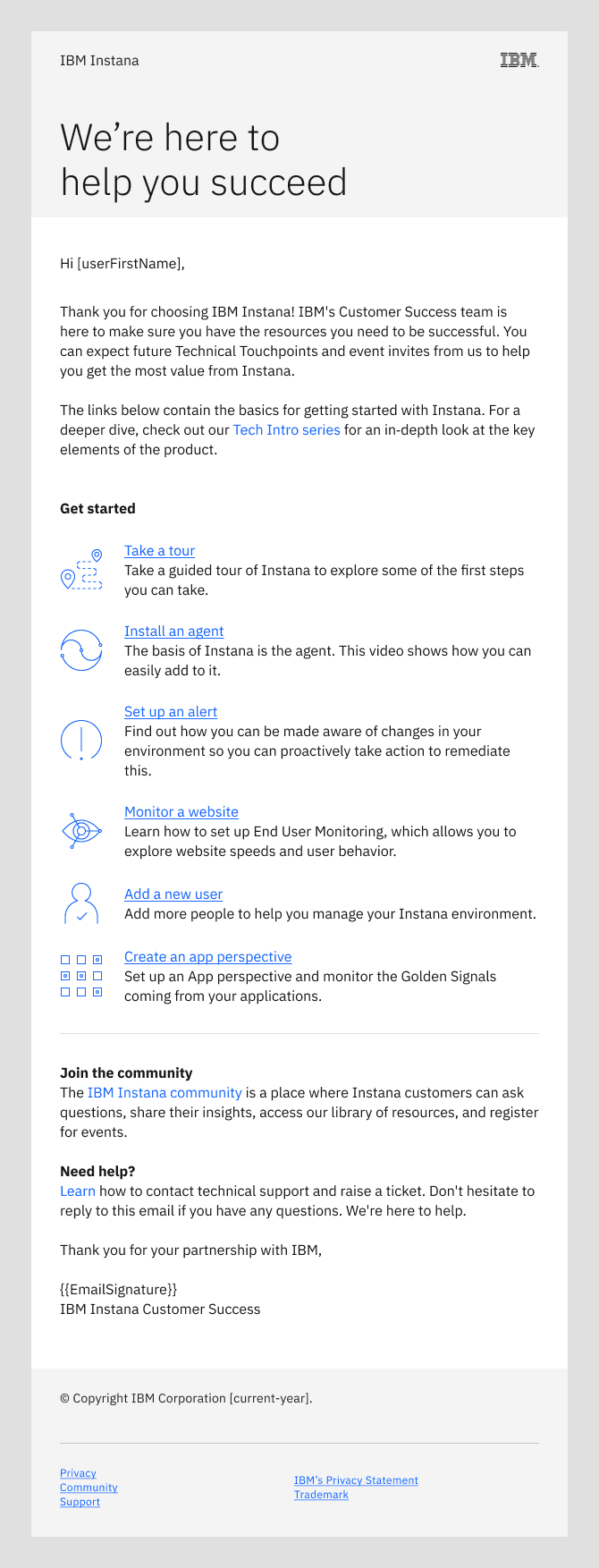
Make the most of your product
- Trigger: Seven days have passed since the minimum contract start date.
- Subject line: [FirstName], make the most of [Product name]
- Sender: IBM Customer Success (CS) Manager or CS Team if unassigned
- Tool: Gainsight Journey Orchestrator, SendGrid
- Recipient: Buyer and/or Admin who purchased the product
Do
- Reiterate that the goal of “IBM Customer Success” is to help the user succeed.
- Keep the content focused on what is essential for a new customer at this early stage, this is the first of many “IBM Customer Success” emails.
- Highlight actions that help the user experience the product’s core value (aha moment) quickly.
- Provide a clear path for help (for example, IBM Support) and subscription management (for example, IBM SaaS Console).
- Ensure customers don’t receive overlapping messages from Product vs Customer Success.
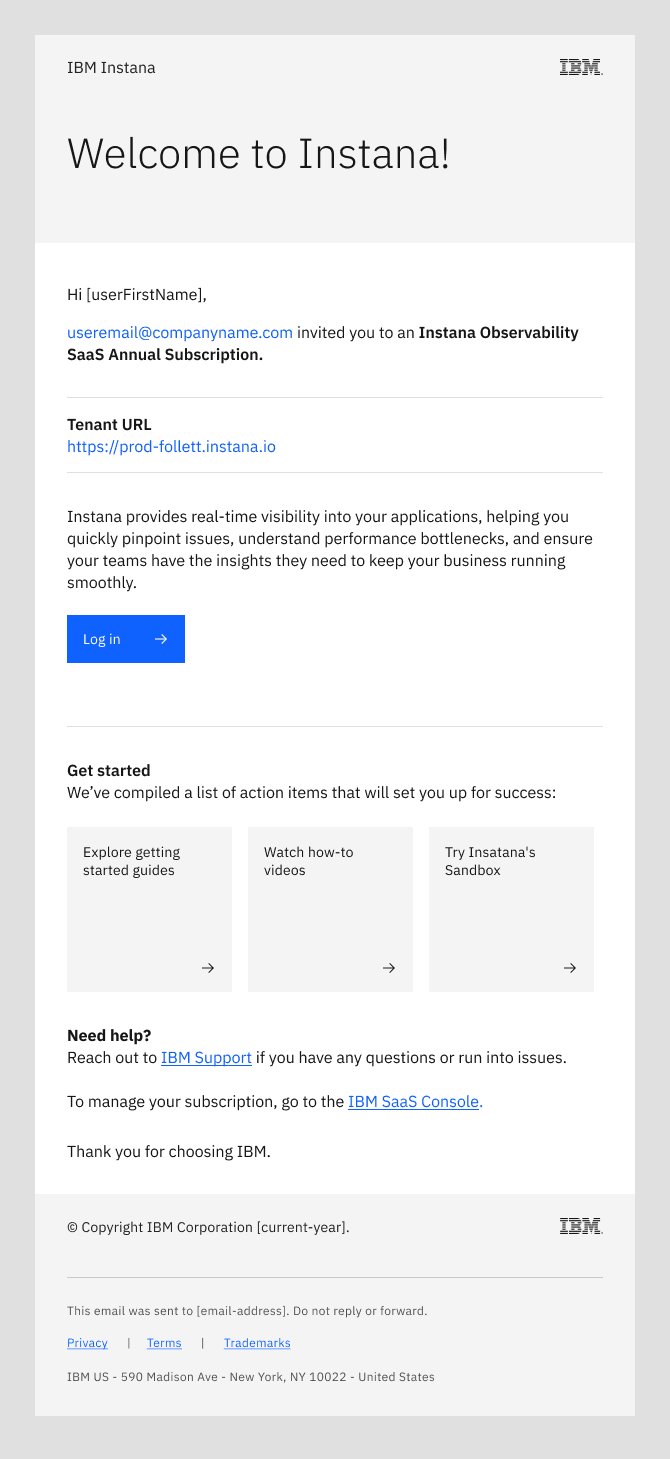
Do
- Clearly state who invited the recipient to establish trust and context.
- Keep the primary call‑to‑action generic since login flows vary across products.
- Highlight the product’s core value proposition for recipients who might be unfamiliar with the product.
- Give the user two or three clear actions they can take right away to start experiencing meaningful value.
- Maintain a welcoming, action‑oriented tone that focuses on how the product will benefit the user.
Don't
- Use overly technical or internal jargon, such as the IBM SaaS console.
- Assume the user expected an invitation to the product.
- Assume the user is already familiar with the product.
- Bury the invitation context; the sender and purpose should be immediately visible at the top.
- Use a transactional tone; the message should feel welcoming, supportive, and user‑centric.